Decide · Evidence
Measuring a noise-suppression rollout: Teams CQD and the Zoom Dashboard, before and after
The headline call-quality numbers in both admin consoles are built from network telemetry, so a noise-suppression rollout will barely move them. Teams marks an audio stream Poor on round trip, packet loss and jitter; Zoom's quality score is a MOS estimated from the network. What a suppression layer can change is the noise your users send, what they report in surveys, and how many audio tickets reach the desk. Measure those, in the same users, over matched windows, and write the confounders down before someone else finds them.
What suppression can and can't change in the numbers
Start with Microsoft's own caveat. Its stream-classification page says the audio classifier "uses basic network performance telemetry", marks a stream Poor if round trip exceeds 500 ms, packet loss rate exceeds 0.1 or jitter exceeds 30 ms, and adds that a Poor label "doesn't mean the audio stream was actually of poor quality, nor does it mean the user perceived a quality issue." Nothing in that rule looks at background noise. A dog barking behind a perfectly healthy connection is a Good stream to CQD.
Zoom is built the same way at the top level. Zoom's technical library describes the Dashboard's audio and video scores as Mean Opinion Scores on a 1.0 to 5.0 scale, improved "by analyzing various network parameters, such as packet loss, latency, jitter, and codec efficiency". Clean the microphone and the MOS has no reason to notice.
Which numbers can a suppression layer move?
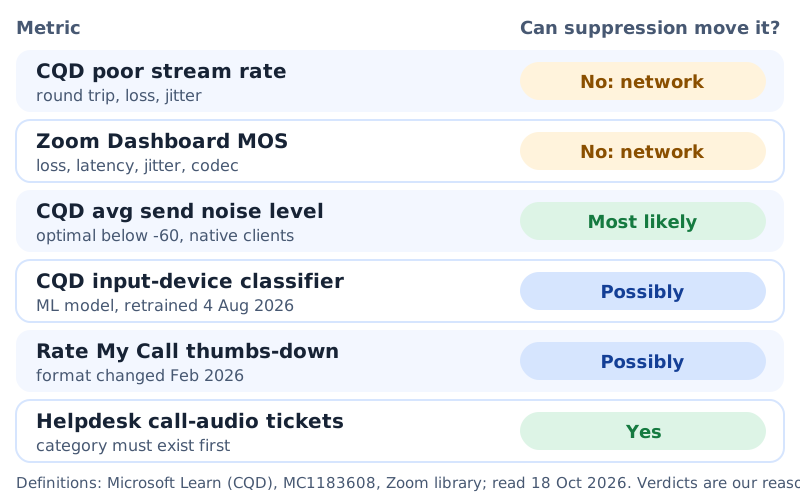
Our reading of Microsoft and Zoom metric definitions, read 18 October 2026. "Likely" is reasoning from where the layer sits in the chain, not a measured result; confirm it in ring 0.
Teams CQD: the metrics and filters to pull
The useful CQD material for a suppression rollout lives one level down, in Microsoft's intelligent media quality classifiers. Their input-device classifiers target "quality issues associated with audio capture devices, including microphones", and the page lists the dimensions behind them, including Avg Second Audio Send Noise Level and Avg Second Audio Send Signal Level. Microsoft gives the recommended signal range as (-24, -14) and calls a noise level below -60 optimal.
That send-noise dimension is the closest thing CQD has to a direct measure of what you are changing. A virtual microphone sits before Teams in the audio chain, so Teams measures the signal it receives after the layer has worked. Expect the send-noise figure to drop for users whose layer is active; that expectation is reasoning, so verify it in ring 0 before you build a business case on it.
Three rules from the same page decide which streams you can count:
- Native clients only. Input-device classifiers "are applied to native platforms (excluding WebRTC based ones) and audio only". Filter out web and WebRTC clients, or they will dilute the comparison with blanks.
- Sixty seconds of media. Outbound classifiers apply only when the user sent at least 60 seconds of audio. Short calls drop out on their own; do not mistake that for an improvement.
- The model changes. Microsoft retrains these classifiers and says retraining is not retroactive. The page listed its latest model update as 4 August 2026. A window that straddles a retrain is two different measuring sticks.
Access matters for the plan, too. Microsoft's CQD setup page lists roles that can read reports, including Reports Reader, and warns that CQD keeps end-user identifiable information for only 28 days. If your comparison needs per-user data, export the baseline before it ages out.
Zoom Dashboard: the equivalent views
Zoom has no published per-user send-noise dimension that we could find in its Dashboard documentation, so the Zoom side of the comparison is thinner. What it does give you, per its support article on the Dashboard:
- Per-meeting, per-participant drill-downs with bitrate, jitter, latency and loss, which are useful for proving that a ring's network did not change between windows.
- Daily data refresh at 12:00 GMT and 15 months of retention, which is long enough to take a baseline from last quarter if you forgot to take one this quarter.
- Custom alert thresholds for audio, video, screen share and CPU, configurable by account owners and admins.
Zoom's library also says the System Health tab must be requested from Zoom Support and is available to accounts at Business level or higher. Use Zoom's figures as the control panel, proving the network held steady, and take the outcome measure from surveys and tickets.
Baseline, window and segmentation
A credible comparison has the same people, the same length of time, and one change between the two windows. Hook it to the rings you are already running from the pilot plan.
One change between two matched windows
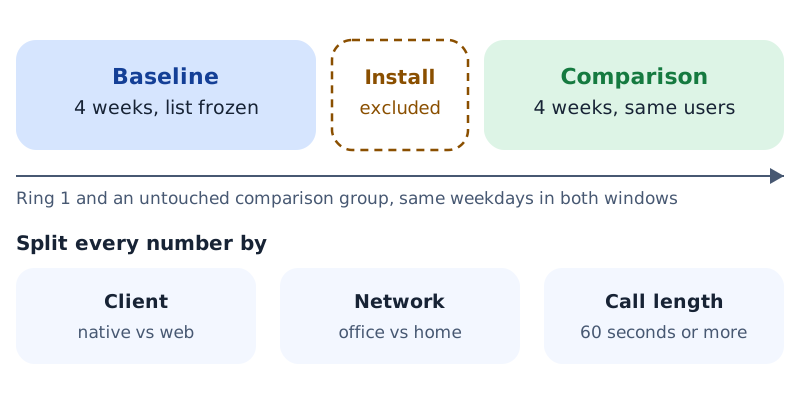
Window lengths are our suggestion, sized so that week one's novelty does not dominate. Use the same weekdays in both windows.
- Same users, not same team name. Freeze the ring 1 member list before the baseline starts. Joiners and leavers go in neither window.
- A comparison group that gets nothing. A similar team on the same network that does not receive the layer tells you what changed for everyone else in the same weeks.
- Exclude the install week. Devices get switched, people test, novelty skews the survey.
- Segment, then compare. Native versus web client, office versus home network (CQD needs a building file to tell them apart), and calls over 60 seconds. A blended average hides exactly the shift you are looking for.
Confounders: survey changes, client updates, seasonality
Rate My Call is the obvious outcome survey, and it changed this year. Microsoft's guide says the survey pops up after "one in every 10 calls", and warns that users tend to answer when calls go badly. Message center post MC1183608 then replaced the five-star survey with thumbs up or down on Windows, Mac and web, with rollout starting mid-February 2026 and completing by late February 2026. CQD now records 5 for thumbs up, 1 for thumbs down, 0 when the survey was shown but not submitted, and null when it was not shown. Microsoft's own note: admins "may notice an increase in poor feedback metrics due to the new rating method; this does not reflect a decline in service quality". Any baseline taken before March 2026 is on a different scale.
Write these down before the baseline starts: the Rate My Call format in force; the classifier model date; Teams and Zoom client versions per ring; any network, VPN or building-file change in the window; holidays and quarter-end in either window. A finding that survives that list is worth presenting.
Client updates are the quieter problem. Both meeting clients ship their own suppression improvements, and the platform levers you configured on the Teams policy page and the Zoom admin page keep evolving. Pin client versions per ring for the length of the comparison if your change process allows it; if it does not, record them so the comparison group absorbs the change.
A one-page report template
This is the page the change board and, later, the renewal meeting will read. Fill every row, including the ones that make the result weaker.
| Field | What goes in it | Source |
|---|---|---|
| Population | Ring and comparison-group headcount, frozen list date | Your assignment groups |
| Windows | Baseline dates, excluded install week, comparison dates | Change ticket |
| Send noise level | Average per window, native clients, calls of 60 s or more | CQD, input-device dimensions |
| Survey | Thumbs-down share of submitted ratings, plus response count | CQD Rate My Call fields |
| Tickets | Call-audio tickets per 100 users per window | Helpdesk category |
| Network control | Poor stream rate and MOS per window, expected to be flat | CQD; Zoom Dashboard |
| Confounders | The list from section 05, each marked yes or no | Your notes |
| Verdict | Expand, hold, or roll back, in one sentence | Change board |
The tickets row only works if the category existed before the rollout. Why that category is so often missing is the subject of the ticket nobody owns.
Questions about measuring call audio
Will our CQD poor-call rate fall after deploying noise suppression?
Probably not. CQD's audio Poor label comes from round trip, packet loss and jitter thresholds. Treat a flat poor rate as your proof that the network held steady, not as a failed rollout.
Which CQD field is closest to background noise?
Avg Second Audio Send Noise Level, one of the input-device dimensions. Microsoft calls a value below -60 optimal. It is applied to native clients only.
Can we compare this year's Rate My Call results with last year's?
Not directly. The five-star survey became thumbs up or down in February 2026, and Microsoft warns the new format can raise poor-feedback figures on its own.
How long should the baseline be?
Long enough to cover a normal cycle of meetings: we suggest four weeks, matched by weekday to the comparison window, with the install week excluded.
What does Zoom's Dashboard contribute?
Network control and history: per-participant jitter, latency and loss, and 15 months of retained data. Its MOS is network-based, so do not expect a suppression layer to move it.
Take the baseline first, then the trial
Krisp's 7-day trial asks for no card, so ring 0 can confirm that send-noise figures move before ring 1 starts its measured window on paid seats. On 18 October 2026 Krisp's pricing page put Core at $8 for each seat per month under annual billing, doubling to $16 on monthly billing, and Advanced at $15, or $30 on the monthly cycle. When the trial lapses, so does access; there is no free fallback.
On the record: Krisp pays RolloutDesk a referral fee if your organization subscribes after clicking, and your price does not change. A measurement plan that might show the platform levers were enough is still the right plan, and we publish it anyway.
Related: the pilot rollout plan this measurement hangs on, the company-wide playbook, and the costs page you will defend at renewal.