The vendor, admin-eye view
Krisp for IT admins: what you're actually administering
Users experience Krisp as a magic microphone. You'll experience it as a console, a seat ledger, an identity integration and a renewal date. This page is the second experience, described honestly — including the places where the enterprise features live a tier higher than you'd like.
The mental model
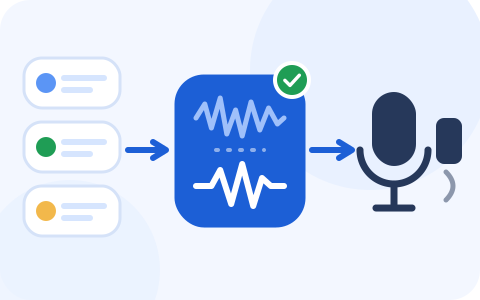
Krisp installs a virtual microphone and speaker at the OS level. Apps point at the Krisp devices; Krisp points at the real hardware; the noise processing happens on-device in between, in both directions. Two properties fall out of that architecture that matter at fleet scale:
- App-independence. One managed install covers every application that uses the microphone — meeting clients, softphones, recorders, the lot. You configure audio once per machine instead of once per app per machine, which is the entire administrative pitch.
- On-device processing. The noise cancellation runs locally rather than in the vendor's cloud — the right default for confidential calls, and a sentence your security review will ask you to prove, so keep the vendor's security documentation handy rather than quoting ours.
One install, every app
Every app
Meeting clients, softphones, recorders — the lot
Virtual mic + speaker
Noise processing on-device, in both directions
The real hardware
The laptop’s own microphone and speakers
What the Admin Portal gives you
Seats and members
Invite, assign, revoke; see which purchased seats are actually attached to humans. This ledger is where the seat math stops being a spreadsheet and becomes enforceable.
The deployment MSI
The portal is the source of the deployment-grade Windows installer and its documented parameters — covered end-to-end on our MSI page. Mac bulk install is scripted; see macOS MDM.
Update control
Centralized update management, so the fleet moves versions when you decide rather than when each client feels like it. Pick one update owner — portal or your package pipeline — and stick to it.
Usage visibility
Enough adoption data to answer the only renewal question that matters: which seats went idle? Ninety days of this beats any satisfaction survey you'll run.
Tiers, priced and translated
| Tier | Price | What it means from the admin chair |
|---|---|---|
| Core | $8/user/mo annual · $16 month-to-month | The workhorse tier: unlimited noise cancellation, the app integrations, 10 GB storage. For most fleets this is the pilot tier and often the forever tier. |
| Advanced | $15/user/mo annual · $30 month-to-month | Adds heavier AI features (longer accent-conversion allowances, more storage at 60 GB, CRM integrations) and “advanced admin controls.” Pay the delta only for features you'll govern with — at 100 seats it's $8,400/yr over Core. |
| Enterprise | Custom | Where the compliance furniture lives: SSO/SCIM, HIPAA support with BAA signing for 100+ seat teams, a super-admin role, on-device private transcription, unlimited storage, a named account manager. (SOC 2 compliance is listed across the paid tiers, not just this one — it's the identity and HIPAA rows that move you up here.) |
| Call Center (CC Core) | $15/agent/mo annual | A separate product line for contact-desk estates — agent-side and customer-side cleanup plus monitoring and analytics. If you run a support desk on a CCaaS platform, price this line, not the Meeting AI line. CC Advanced adds translation/analytics and offers a 14-day evaluation. |
Per user, per month, by tier
What we'd verify in your security review
- Processing locality: confirm in current vendor documentation that noise cancellation runs on-device for your platforms, and note which other features (transcription, AI notes) touch the cloud under your chosen tier. The distinction is easy to blur in a review meeting; don't.
- Data retention for meeting artifacts: if you enable the note-taking side of the product, the storage quotas above become governed data. Decide whether you're buying a noise tool or a meeting-records tool — they carry different review scopes.
- The BAA gate: HIPAA support with BAA signing is listed for 100+ seat teams on Enterprise. Under 100 seats and covered by HIPAA? That's a direct conversation with the vendor, not an assumption.
When Krisp is the wrong call
Consistency demands this section. Skip the paid layer when: your fleet lives entirely inside one meeting platform and the Teams or Zoom levers test well; your headcount of call-heavy roles is a dozen people (hand-configure them and move on); or the budget conversation would crowd out something that matters more. The playbook's decision table makes this call in six questions, and “stop at the free levers” is one of its two legitimate outcomes.
Trial first, contract later
The 7-day trial includes the Admin Portal, which means you can audition Krisp as an administrator — package the MSI, assign seats, watch the usage data — before anyone signs anything. That's the audition that matters.
Referral link, declared: when an organization licenses Krisp after clicking this button, Krisp pays RolloutDesk a fee, and the quote you receive is the one you would get going direct. Nothing above was supplied or reviewed by the vendor.
Admin FAQ
Can users bypass a managed Krisp install?
They can always select a different microphone in an app — Krisp isn't a lockdown tool, it's a default-setter. In practice, defaults win: set the Krisp devices as system default in the image and most users never change them.
Does it fight with Teams' or Zoom's own processing?
Stacked suppression is mostly redundant rather than harmful, but pick one owner per platform: if Krisp handles cleanup, set the meeting client's own processing lower or off — by policy, not by asking users. The Teams and Zoom pages show which side of that is actually policy-controllable on each platform.
What happens to seats when people leave?
On Enterprise with SCIM: the HR-driven deprovision reclaims the seat. Below that tier: a quarterly portal review is your compensating control — put it on the calendar the day you buy, because idle seats are the single biggest line in the waste math.